
Once you’ve installed the Morpheus app and created your account, the final step before using Morpheus to measure HRV or train is setting up your Morpheus M7.
Good news — setup is quick and easy, and only takes a few minutes.
If you have any questions at any point, our support team is always available through the Morpheus support portal.
What Is the Morpheus M7?
The Morpheus M7 is a high-accuracy chest-worn heart rate monitor designed specifically for Morpheus Training.
It measures your heart rate and heart rate variability (HRV) with medical-grade precision, allowing Morpheus to personalize your daily recovery scores, training zones, and workouts.
Unlike wrist-based devices, the M7 captures your heart’s electrical signal directly from the chest, which provides more accurate and reliable data, especially during training.

You’ll wear the M7 for:
Daily morning recovery tests
Live workouts in the Morpheus app
Syncing workouts recorded using the M7’s memory mode
Note: The M7 is not worn during sleep nor any other time throughout the day. It is only worn for the recovery test and for workouts.
Note: Any time you want to use the M7 for any purpose, you must be wearing it so that it powers on. Without doing so, you cannot connect it to the app (or to anything else).
Once set up, the M7 automatically handles the data collection — you just put it on go.
Charge the M7
Your M7 may arrive with some battery charge already, but we strongly recommend fully charging it before first use.
When charging is complete, the LED light will turn solid green.

⚠️ Important Charging Instructions
To avoid damaging your M7, please follow these rules carefully:
Use only the USB charging cable that came in the box (or one just like it).
Do not use high-power or “quick charge” cables or adapters
Do not use high-voltage wall outlets (such as 240V outlets)
Recommended charging options:
A laptop or desktop computer USB port
A standard 5V USB wall adapter
Battery care tips:
Do not charge the M7 overnight
Do not leave it plugged in for long periods of time after it is fully charged
You do not need to charge the M7 if the battery is above 50%
When the M7 is connected in the Morpheus app (for a recovery test or workout), you’ll see the remaining battery level in the upper-left corner of the app.

NOTE: After your heart rate signal has been found and the M7 starts blinking blue, it does not continue to blink blue the entire time you are wearing it. It will stop blinking blue after about 10 seconds, but the device remains active.
You can see the remaining battery life of your M7 in the upper corner of the screen after connecting it to the app for a recovery test or a workout. It will appear there before you tap the Start button and will disappear after tapping Start.

Wearing the M7
Note: you must be wearing the M7 properly so that it powers on and can then be connected to the app.

 Strap Placement
Wear the M7 just below your chest muscles, with the sensor centered over the bottom of your sternum.
Put the strap on first, then snap the transmitter onto it.
If front placement won’t work for your activity, you can wear it on your back (not on the spine). You may need to rotate the transmitter upside down.
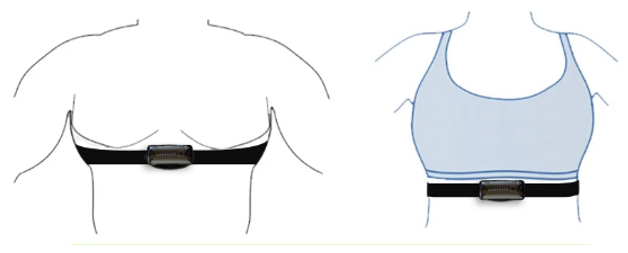
Women may need to or want to slide it a bit higher so that the transmitter and strap sits under a training bra, and that works very well for many women.
Skin Contact
The strap must fit snugly to stay in contact with your skin.
If it lifts off your skin during movements (like deadlifts or bent-over rows), tighten it.
If you’ve tightened it fully and it’s still too loose, we may need to get you a smaller strap.
- For high-movement sports, some people use waterproof tape to keep the strap secure.
 Moisture Matters (Very Important!)
Before your recovery tests and workouts:
Add water or electrode gel to the rubber electrode areas of the strap.
Put the strap on first
Then wet the electrodes (and a little bit of your skin under them)
Snap the transmitter onto the strap last

If it’s cold, dry, or you wear moisture-wicking clothing:
Your skin may stay dry longer, which can cause jumpy readings. In those cases, adding moisture becomes even more important.
Activating the M7’s Internal Memory
One of the features of the M7 is that it can record your workouts so that if you are training without your phone, you can sync and import the workout to the Morpheus app afterward. This method is ideal when using your phone during training is impractical.
To record workouts, the M7 needs to have its internal memory activated. There are 2 ways to do this:
- Complete a recovery test in the app with the M7
- Complete the sync/import process in the app with the M7
- When you do this, you’ll see a message that there are no workouts on your M7. But moving forward, your M7 will record your workouts to its internal memory.
For more detailed information on the workout sync and import process, please read the lesson at the link below.
Training without the Morpheus App – Sync & Import
FAQ & Troubleshooting
For tips, common questions, and troubleshooting help, check out the FAQ & Troubleshooting lesson later in the Morpheus 101 course.
Need Help?
If you need additional assistance:
Submit a support ticket directly from the Morpheus app. Just tap Get Support in the menu of the app and then fill out & submit the support ticket.

Or email us at [email protected]
📩 We respond to all support requests within 24 hours, Monday–Friday, and we’re always happy to help you get the most out of your M7.